
Dentally integration: online booking, patient forms and reporting connected to your diary

For UK practices and dental groups that run their diary in Dentally and lose reception time to calls, forms and spreadsheets.

We connect booking, patient forms and reporting to Dentally through the Dentally API, so appointments and patient details land in your diary without retyping. Your practice enrols in Dentally's Practice Integration Program, Dentally issues API credentials scoped to your practice, and we test every connection before it touches your live diary.

Talk to our team

What practices connect to Dentally

Choose a connection and watch where it lands.

Online or AI booking

When
A patient books online or through an AI booking assistant
In Dentally
The appointment written into the Dentally diary with the right clinician, appointment type and length
No more
Phone calls to book and rebook
When
A patient books online or through an AI booking assistant
Today
Phone calls to book and rebook
Who
Your reception team, by hand

New patient forms

When
A new patient completes a registration form on your website or booking page
In Dentally
The patient record created or updated in Dentally with their details
No more
Retyping paper and PDF forms at reception
When
A new patient completes a registration form on your website or booking page
Today
Retyping paper and PDF forms at reception
Who
Your reception team, by hand

Follow-ups

When
Treatment is left unbooked or a recall lapses
In Dentally
Follow-ups built from Dentally appointment and treatment plan data, such as unbooked treatment and lapsed recalls, sent by SMS or email alongside Dentally's own reminders
No more
Chasing patients by phone
When
Treatment is left unbooked or a recall lapses
Today
Chasing patients by phone
Who
Your reception team, by hand

Group reporting

When
Appointments, cancellations and enquiries happen across your sites
In Dentally
Appointments, cancellations and enquiries across all your sites in one view, with history kept beyond Dentally's 90-day API window
No more
Building spreadsheets from each site
When
Appointments, cancellations and enquiries happen across your sites
Today
Building spreadsheets from each site
Who
Your reception team, by hand

AI reception

When
A patient asks a routine question or wants to move an appointment
In Dentally
The answer given or the appointment moved in Dentally, with anything else handed to your staff
No more
Reception time spent on routine calls
When
A patient asks a routine question or wants to move an appointment
Today
Reception time spent on routine calls
Who
Your reception team, by hand

See it working

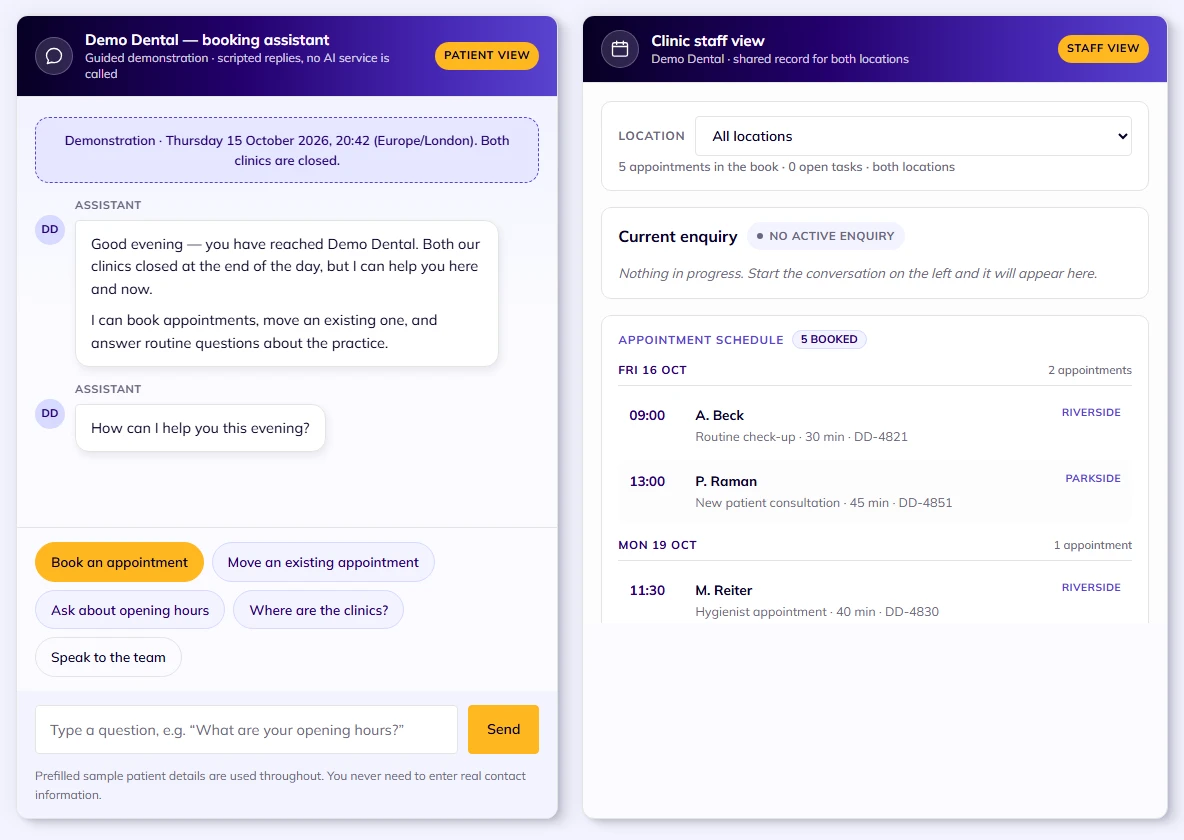
Dental booking demo: patient booking assistant beside the reception view
Demo

Dental booking demo

An AI booking assistant and the reception view it updates, working end to end.

Try the booking demo

What you need for a Dentally API integration

  • Your practice enrolled in Dentally's Practice Integration Program, which issues API credentials scoped to your practice
  • Your booking rules: appointment types, lengths and which clinicians take them
  • Your sites, and the reports your team builds by hand today
  • Time to test each connection with your reception team before it goes live

Arranged with Dentally

API credentials are issued by Dentally through the Practice Integration Program and scoped to your practice. Each connection's permissions are agreed when it is set up.

How a Dentally integration project runs

  1. Map how patients reach you

    Bookings, calls, forms and enquiries, and what reception types into Dentally.

  2. Arrange access with Dentally

    Enrolment in the Practice Integration Program and the permissions each connection needs.

  3. Build one connection first

    Usually online booking, because it saves the most calls.

  4. Test before it goes live

    On test appointments first, then with your reception team, before it touches your live diary.

  5. Extend to the next step

    Patient forms, reminders or group reporting, one at a time.

Need help with your Dentally integration?

Both paths start with one conversation.

Connect Dentally

Your booking, patient forms and reporting connected to Dentally through its API.

Build what is missing

When no tool covers a step, we build it as custom software, like the booking assistant in our dental demo.

Leonid PlokhykhCo-founder & CEO

On the call

  • How your practice uses Dentally today
  • What can connect, and what Dentally's API allows
  • Where to start
Book a call with Leonid

Dentally API documentation and details for your developer

Forward this section to the person who manages Dentally at your practice.

Dentally API documentationdocs.api.dentally.com
API
Dentally NexGen API (v2), with the version set in the Dentally-API-Version header (2026-01-01)
Authentication
OAuth 2.0 client credentials, issued to your practice through Dentally's Practice Integration Program
Environments
UK production at api.dentally.co, with a UK sandbox at api.sandbox.dentally.co
Access
One practice per request (X-Practice-Id header), with scopes agreed at onboarding
Data
Appointments, patients, practitioners, sites and rooms, treatment plans, invoices, payments and NHS contracts

Dentally integration FAQ

Does Dentally have an API?

Yes. Dentally's NexGen API can book, reschedule and cancel appointments, read practitioner availability and create or update patient records. Credentials are issued by Dentally through the Practice Integration Program, and each connection is tested before it touches your live diary.

What does Dentally connect to without custom work?

Dentally includes online booking and patient forms through Dentally Portal, its own appointment reminders, and products from approved partners in its Partner Marketplace. For a connection built around your own booking page, forms or group reporting, your practice enrols in Dentally's Practice Integration Program and we build it on the Dentally NexGen API.

Can online booking write appointments into the Dentally diary?

Yes. Dentally's own online booking writes into the diary, and through the Dentally API your own booking page or an AI booking assistant can book into the same diary, within each clinician's working hours and with your appointment types and lengths.

Can a dental group report across all its sites from Dentally?

Yes. Dentally's group view shows performance across sites. We build reporting on top of it that brings in what sits outside Dentally, such as website and phone enquiries, alongside appointments and cancellations from every site.

Is a Dentally integration GDPR compliant?

Yes. We build Dentally integrations to meet UK GDPR requirements, sign a Data Processing Agreement with your practice, keep patient data in the UK or in your practice's own cloud account, and move only the fields each connection needs.

How long does a Dentally integration take?

It depends on how many connections you need and on your practice's enrolment in Dentally's Practice Integration Program. We build one connection first, usually online booking, so it is working before the rest is added.

Discuss your project

Show us how bookings and enquiries reach your practice, and we'll tell you what connects to Dentally.

Please enter your name.
Please enter a valid email address.
Please describe your project in a few sentences.
  1. We’ll review your message and contact you to discuss the requirements.

  2. Once the scope is clear, we’ll propose an approach and prepare an estimate.

  3. [email protected]